Chapter 1
INTRODUCTION TO COMPUTERS
WHAT IS A COMPUTER?
A computer is a programmable electronic device designed to work with information and that can be instructed to manipulate data and information. A computer is an electronic device, operating under the control of instructions stored in its own memory, that can accept data, process the data according to specified rules, produce results, and store the results for future use (Shelly, 2010, p. 7). The term computer came from a Latin word ‘Computer’ meaning to calculate or a programmable machine. The word computer refers to Center Processor Unit and Internal Memory. It has the flexibility to store, retrieve and method information. Modern computers and able to use generalized set of operations called programs. A computer cannot do anything without a program. These set of instructions are used to perform wide variety of tasks. A computer takes unrefined data as input, the data undergoes different procedures this data in the control of program, provides result as output and saves output under user’s demand. A computer processes both numerical or arithmetic and non-numerical or logical calculations. Charles Baggage called “The father of computer” was a mechanical engineer.
HISTORY OF COMPUTER
Generation name
Year
User interface
Technology
System names
Picture
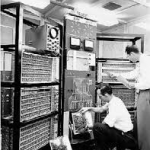
First Generation Of Computer
1940 – 1956
Through punch card
Vacuum tubes
IBM-701
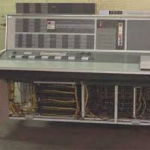
Second Generation Of Computer
1956 – 1963
Punch card
Transistors
IBM 1620
Third generation
1964 – 1971
Keyboard, mouse
Integrated circuits
Honeywell-6000 series

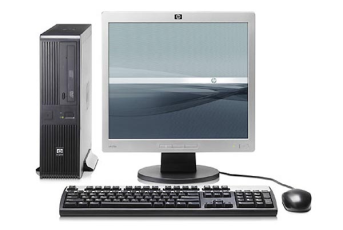
Fourth generation
1972 – 2010
Keyboard, mouse, camera
Microprocessor
STAR 1000
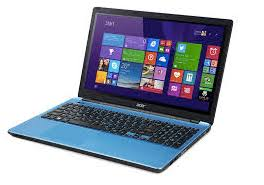
Fifth generation
2010 to present
Keyboard, mouse, camera, touch screen
Artificial intelligence
Ultra book
DATA AND INFORMATION
Data is related to representing facts and figures, instructions, concepts or knowledge in an formalized manner.
Data Representation
Alphabets
(A-Z or a-z)
Digits
(0-9)
Special Symbols
(+,-, /,*, =.>, < )
TYPES OF DATA:
- Quantitative Data
- Continuous Data
- Discrete Data
- Qualitative Data
- nominal
- ordinal
QUANTITATIVE DATA:
The data that we can count. It is usually measured in numerical form. For example, your height, weight of vegetables or fruits, pair of shoes , shirts etc.
CONTINUOUS DATA
The data that have no gap for calculation. It is calculated continuously. For example, Calculation of students of any class.
DISCRETE DATA
The data that take a particular value for calculation. For example, the number of parts that DAMAGED IN A CAR OR MOTORBIKE.
QUALITATIVE DATA
The data that is calculated by its characterizes and quality. For example, the Softness of hands, the color of dress, the hardness of tree.
NOMINAL DATA
Nominal data is characterized as information that is utilized for naming or naming factors, with no quantitative worth. It is here and there called “named” information. For example, gender, race, hair color.
ORDINAL DATA
Ordinal data is a kind of categorical data with a set command or scale to it. For example, movie ratings, political affiliation.
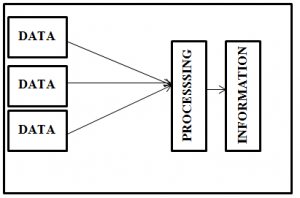
INFORMATION:
Information includes prepared or categorized facts which is significant and is processed in a meaningful way in accordance to the requirements. For example, test score.
CHARACTERISTICS OF INFORMATION
1. ACCESSIBILITY
Information should be easy to acquire or access.
2. ACCURATENESS
Data must exact enough for the use of any place. To acquire data that is 100% exact is normally ridiculous as it is probably going to be too expensive to even think about producing on schedule.
3. RELIABILITY OR OBJECTIVITY
Reliability quality arrangements with the reality of data or the objectivity with which it is introduced. You can possibly truly utilize data rapidly on the off chance that you make certain of its dependability and objectivity.
4. RELEVANCE/APPROPRIATENESS
Information should be appropriate to the reason for which it is required. It must be reasonable.
5. COMPLETENESS
Information should be containing entirely the subtleties needed by the user.
6. LEVEL OF DETAIL
Information should be in a structure that is adequate.
7. TIMING
Information need to be on time for the determination for which it is essential.
8. VALUE OF INFORMATION
The overall worth of data for dynamic can increment or abatement its incentive to an association.
INFORMATION LIFE CYCLE
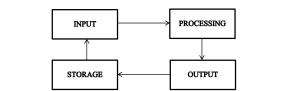
Method of performing processing on input and achieve useful output, this method is called information processing cycle.
Following are the four phases of Information Processing Cycle.
1. INPUT:
Input is arriving data into the computer. Feeding all the data and instruction to computer in the cycle for processing .This raw data is brought for getting information.
Input can be done by using numerous devices such as keyboards flatbed, barcode reader, joy stick, data tablets, electronic cash registers etc.
2. PROCESSING
Execute some processes on data is called processing. As input remains provided the data is further processed by methods. The most important stage as it gives the processed data in the form output.
3. STORAGE:
Storage is the process of saving data in a soft or physical form. Storing can be on external hard disk, pen drives inbuilt hard disk, micro SD cards or registers.
4. OUTPUT:
Results obtained at the end is called information. This is the outcome and the raw data which was provided in the main stage of input is now handled and the data is valuable and is now called information. This data can be used as it is or could be further used with some other data or information.
THE COMPONENT OF A COMPUTER
Computer components support interaction between the computer and its human users. The input components consist on two further of all the peripherals, or external devices, used to pass knowledge to the computers. Keyboards, mouse and networks devices samples of input elements. The output element communicates information from the pc back to the user. samples of output element devices embrace monitors, printers and external drives. Networks conjointly function output devices since they supply two-way communication between computer and user
There are five major components of computer
- Input devices
- Output devices
- System unit
- Storage device
- Communication device
INPUT DEVICES
Input device are those electronic.
KEYBOARD
A keyboard is input device that enables an individual to enter letters, numbers, and alternative symbols into a computer. It’s one amongst the foremost used input devices for computers. A keyboard contains several “keys” There are differing kinds of keyboard layouts factory-made supported the region and language used.
QWERTY: QWERTY layout is the utmost generally utilize and is called when the primary 6 letters that seem happening the highest row. This layout is often factory-made these days thanks to its quality.
AZERTY: AZERTY was established in France .and its another variation to the QWERTY layout.
DVORAK: DVORAK design was formed to cut back finger movement once writing, manufacture quicker writing quick than QWERTY or AZERTY.
POINTING DEVICES
A inform device, or generally referred to as a inform tool, may be a hardware data input device that enables the user to send the mouse indicator during a malicious program or interface software system. Employing an inform device, you’ll purpose at or manipulate any object or text on the screen. For instance, employing a inform device you’ll purpose at and choose AN icon from an inventory of icons.
There are different types of pointing device
- Mouse
- Track ball
- Touch pad
- Graphic tablet
- Touch screen
- Light pen
- Joy stick
MOUSE
A mouse is an input device. Mouse looks like mouse.it has ball inside its body that is moved on the plane surface causes a corresponding cursor movement on the screen it allows us reposition the cursor movement on screen. it has button on its uppermost surface which link certain command to computer although pressed Button is utilized to invoke command.
TOUCH PAD
The touch pad is slight flat surface over which we move finger and same movement produce like in through mouse. As we move finger cursor follows finger direction. We clicking by touch the finger on pad surface. Its mostly used in laptops.
GRAPHIC TABLET
A graphic tablet contain of a tablet linked through a cable to a stylus or puck. A stylus is pen similar device by which user draw an image A puck is copping device with which user duplicates an image . Puck resembles with mouse but has dissimilar type of keys and a plastic unit. Graphic tablet are mostly used in designing and production. when used with illustration program a graphic tablet permit to ensure shading and many further things alike to artist achieve with pencil. Using puck we may do drawing on tablet and a digitalized duplicate kept in the system/pc.
TOUCH SCREEN
Touch screen is a screen that is sensitized to obtain input from simply moving finger on it .This is enclosed with a plastic coating.
LIGHT PEN
The light pen is a gadget that consists on stylus similar device linked through a cable to the systems/pc. The operator carries the pen to wanted place. Press the pen button on the screen which recognize the screen position.
JOYSTICK
Joy stick is a directing device that consist of a sticks place on a it and also has two buttons. It is fundamentally used in games and computer aided design.
OUTPUT DEVICES
Hardware/software components which are used to obtained output.
- Monitor
- Projector
- Speakers
- Headset
- Projector
- Plotter
MONITOR
Monitor can be the most mutual laptop output gadget. Monitors are offered varied sizes and resolutions.
GENERAL KINDS OF MONITORS
CATHODE RAY TUBE: It is used light spots to come up with the picture elements which represent pictures.
FLAT PANEL SCREEN: It used to make display using fluid crystals. Lightweight is additional experienced the fluid crystals so as toward come up with picture elements.
PRINTER
Printer is a output device produces a hard form kind of knowledge, similar information on papers and pictures. Computer conveys the knowledge to this output device that reconstructs the image/pictures usually on paper.
KINDS OF PRINTERS:
INK JET: In jet is the type of printer that sprigs small spots of liquid ink on a paper to create a picture.
LASER: laser is the kind uses toner cylinders which move through magnetized pigment/color , formerly transmissions the pigment/color onto a surface.
DOT MATRIX: This kind of printer employ a print head to line pictures on a surface, mistreatment associate degree liquid ink ribbon/tape.
SPEAKERS
It is output device hooked up to computer to enable the production of sound, computer speakers use sound cards. There are many types of speaker which vary from feature s to feature.
HEADSET
This is also a output gadget that the mixture of speakers and mike. it’s mostly employed by gamers, and moreover a good instrument to communicate with family and friends over the net.
PROJECTOR
Projector is a show device which comes a system/computer-created image against additional surface. The computer transmits the image information to its videofilme card that then directs the video/film picture to the projector. It’s most frequently used for displays, or for viewing videos
PLOTTER
Plotter is a device which generates the output in bigger level in digital manner. Plotter uses the pens to draw the output in paper. It’s mostly utilized in production applications.
SYSTEM UNIT
It contains the CPU, motherboard, RAM, with different elements too. The system unit conjointly contains the interior elements of computer
COMPONENT OF SYSTEM UNIT:
MOTHERBOARD: it is a core circuit of small computers. Additionally grasp as main board or system board.
CPU: Process unit CPU (central processing unit )is that the dominant electric chip that governs the development influence of the system/computer .
MEMORY: it is the portion of computer which rapidly store application data.
BUS:A bus is the portion which connect the different parts of CPU (central processing unit ).
EXPANSION SLOT: expansion slot appear on the motherboard. Area unit they are plugs into that connecters are connected
PORTS AND CONNECTIVES: This elements of CPU (central processing unit ) act as connector settled upon motherboard otherwise separate.
POWER OFFER: A power supplier alter the old-style house hold power into electricity that a computer will use.
STORAGE DEVICES
Hardware units which are used to store data. There are two type of storage devices
PRIMARY STORAGE DEVICES: Typically, lesser in magnitude, develop to convey knowledge and square measure interior to the computer. They essential the rapidest knowledge access speed, and embrace RAM and cache memory.
SECONDARY STORAGE DEVICES: These typically have huge storing data ability, and that they stock knowledge. It may be internal an external. For example: magnetic disk.
Secondary storage devices names
Storage Capacity
Magnetic Storage Device
100GB to 1 TB
Floppy disk
800 KB to 2.8 MB
Hard drive
1000 GB
Magnetic disk
Several tens of thousands up to several billion bits
Super disk
1.44 MB
Cassettes
148 GB per square inch.
Zip disk
1GB and 2GB
Optical disk
4.7 GB
Blu ray
25 GB for single-layer discs
CD-ROM
194 MiB (8 cm), 650–900 MiB (12 cm)
Cloud storage
1024 Petabytes of data
USB(Universal Serial Bus)
2 TB
Communication Devices
A communications device is any style of hardware capable of transmittal knowledge, directions, and knowledge between a sending device and a receiving device. One style of communications device that connects a communications channel to a receiving device like a computer may be electronic equipment. The communication devices transmitting an analog or digital signal over the telephone or other communication wire .
There are different types of communication devices
DIAL UP MODEMS
Modem is device that convert the digital signal into analog signal from to sender modem over phones line at receiving modem at receiving side convert the analog signal back into digital signal the speed of fast modem is 960 bps
Modem is divided into parts
- External Modem
- Internal Modem
- Wireless Modem
ROUTER
It is communication device that is used to transmit data between two computer and devices router send the data /information through IP address router is mostly used in wireless communication
HUB
Hub is small i9nexpensive device that is used to connect the different network to each other they are mostly used for home networking it is used where direct communication required. there are three types of hub
- Passive hub
- Active hub
- Intelligent hub
FAX MACHINE
This is also a communication device that is used to send picture and text over a telephone line it is consist on an optical scanner and a printer for printing the coming message.
ADVANTAGES AND DISADVANTAGES OF USING COMPUTERS
ADVANTAGES OF USING COMPUTERS:
1. INCREASES PRODUCTIVITY: It increases the productivity of the human for example good understanding of the software which are running on the computers a human will be able to perform different tasks in less time. The example would be with the basic understanding of word processor a human can create, store, edit and share the documents. Which is impossible to do without computers

2. CONNECTS YOU TO THE INTERNET: Connection to the internet means using latest applications and connecting to the world in this way. Social interaction is done when the internet connection is made as well as modern world activities are carried out.
3. VAST AMOUNT OF INFORMATION IS STORED AND WASTE IS REDUCED: Computers have vast storage capacity so they can store huge amounts of data and information. For example eBook readers can store hundreds of thousands of books. Being able to store books, movies, songs and much more you can also share them among others.
4. HELPS SORT, ORGANISE AND SEARCH THROUGH STORED INFORMATION: Computers can use the stored data very efficiently as compared to any other device. It can be searched easily at any time within seconds.
5. BETTER UNDERSTANDING OF THE DATA STORED: The businesses have data bases where the details of the products are stored and can be quickly analyzed at anytime to see and compare the sales of different products. This is beneficial for the businesses to better understand about the products, needs of the customers and competitive edge against their competitors.
6. KEEPS YOU CONNECTED: Computers keeps you connected to the friends and family living away via social networking. You can email, video call or chat with them. At any time and at any place.
7. KEEPS YOU INFORMED: Better understanding of the things and better learning of the fields you are interested in. There are thousands of websites to teach you different things of your interest. Keeps you updated about the news and what is happening around in the world.
8. YOU CAN MAKE MONEY: Freelancing can be done very easily now a days if you have skills about it. You can do online businesses and make a lot of money through it. It is efficient and fast if you keep your systems updated.
9. SAVES TIME: It performs all the tasks very efficiently weather its about the business or related to job or maybe social networking. It performs the tasks in time and saves time as compared to if performed manually.
10. PRODUCES EMPLOYMENT: People can do online jobs and businesses both. People can also teach online and make money in many different ways. It is a very vast field in now a day’s world.
DISADVANTAGES OF USING COMPUTER:
1. HEALTH ISSUES: Using too much computer can make you lazy and physically weak. Using computers for long time can cause serious health issues for example eye sight problems, brain damage, and distraction from daily activities? Your blood circulation can become poor due to less physical activity

2. TIME WASTAGE: While using computers you can waste a lot of time without even realizing what have you done. Maybe you are too busy socializing with your online friends that you ignore your family living with you.
3. DEPENDENCY: You start to depend on the computers even for the simple daily tasks which can easily be performed by yourself.
4. LOSS OF PRIVACY: Your data can be leaked and reach in the hands of others. Which are not safe, people can use it against you. It could be your private pictures of data of your business activities. It could be anything very personal and important for you.
5. ANTISOCIAL AND DEPRESSED: You could become so busy with the computer that you have no time to interact with the people around you which can make you anti-social and can cause depression.
NETWORKS AND THE INTERNET
INTERNET
Internet nowadays
In the early days the majority simply use the internet for getting information only. But today’s internet may be a perpetually evolving tool that not just consist on the incredible form of information, however additionally provides the new methods of accessing , interacting and connecting with the user and content. As a result new terms are continuously appearing as a better and new technology occurring?
WHAT IS INTERNET?
Internet stand for international network. The internet is generally known as “net”. More than 190 countries are connected to each other for exchanging data information news and opinions. It is a large network of computers all over the world that are connected to each other. Network is known as society or club of two or more computer system connected together. These computer networks are connected from all over the world run by the organizations and different companies. It include many high band-width knowledge lines. These lines are connected to major net hubs that distribute knowledge to alternative locations, like net servers and ISPs (internet services protocol)
It is the basic physical and organizational structures and facilities that allows your order the weekly shop, share your life on the Facebook. 30% of the world’s population is on the Facebook
There are more than 1.9 billion websites on the internet.
HISTORY OF INTERNET
Internet developed in 1960 for communication during the battle between Russia and America. America wanted to exchange and share the information and ideas with its force so at this time a scientist from M.I.T and ARPA name J.C.R Likelier give a solution “galactic network” developed for exchanging information with each other. Four computers was connected in the beginning. The project was handed over to DARPA (defense advance research project agency). After that different companies and organizations start making network for communication and providing data to people. After some time all developed networks connected by DARPA for making a big network and that is known as internet. DARPANET could be a term typically used
for ARPANET the first network from that today’s network evolved. The ARPA the first developers of the first packet switch network that came to be known as the ARPANET was rename the DARPA. ARPANET adopted TCP/IP on January 1, 1983 and from there researchers began to assemble the networks of the network that become modern internet at this time ARPANET and defense data network officially change to TCP/IP stander
In 1965 another method was developed for sending the data and information from one computer to another that is called “packet switching”. In packet switching data is divided into blocks or packets before sending. In 1989 all the networks replace by National Science Foundation (NSF) the internet is available to all people
TYPE OF INTERNET CONNECTIONS
- Wireless connection
- Cable connection
- Dial -up connection
- Satellite connection
WIRELESS CONNECTION:
There is no need any cable or telephone line for internet connection in wireless or Wi-Fi. Radio Frequency is used for internet connection.it is typically more expensive. Wireless internet is “always on” connection that can be access from any location. Modem is used in wireless signal which pick the internet signal and transfer to the devices. Available in metropolitan area.
CABLE CONNECTION
Provide the internet connection by using cable modem. Coaxial cable is sued for internet cable connection It convert an analog signals to a digital signals. The speed in cable connection depend on the uploading downloading or transferring data. Downloading speed range is 1Mbps to 1,000 Mbps. Uploading speed range is 1Mbps to 50Mbps
DIAL-UP CONNECTION
A dial-up association is established two or more than two or a lot of communication devices use a public switch telephone network to attach to an online service supplier. It is the most stander form of internet. Telephone lines are used for connection in dial-up connection. It is the slowest and the most inexpensive. A dial-up lines are often called switched lines. Its speed is only 56 kbps. This network has evolved from analog to digital medium
SATELLITE CONNECTION
It is a type of connection in which data is send and data is receive through the satellite. It is a wireless connection. Satellite connection is simple and excellent.in that areas where the dial-up or cable modem connections are not available this satellite option is good for them. In this connection user use the satellites with the dish for getting high speed internet connection. Generally satellite internet speed is 12 to 100 Mbps but Mbps you get depend which IP and plan you use
SERVICES OF THE INTERNET
Services that provide by the net are used for businesses, marketing, downloading and for getting data and information. Various services are
- World wide web
- Chat group
- File transfer protocol
- Instant messaging
- News group
Email stand for electronic mail.it is faster than paper mail. It is a way of sending or exchanging the data, information or messages from the author to the receiver. Email is used for sending receiving and store messaging. The data could be in any form graphics, sound and video. Some popular e-mail are Gmail, Hotmail, and yahoo.
WORLD WIDE WEB
Www is known as World Wide Web and also known as w3. It is the most important service provided by the internet.it is the collection of websites all type of information are available and a user can easily search and get data and information that is required
CHAT GROUP
Chatting is a process in which data is exchanged or giving views to each other on internet by typing message. Many groups can be join for chatting and exchanging information. The user can talk to each other in real time. In chat group all users should online at same time. In chat group people exchange messages on internet
FILE TRANSFER PROTOCOL
FTP is file transfer protocol that is used for transferring file on internet. We can also upload and download the image, videos and graphics. Different soft wares are used for transferring file on internet. These software are cute-FTP and WS-FTP
NEWS GROUP
News group is a online discussion on special topic. For message to a news group a news reader is required. On the internet there are thousands of news groups are available
Advantages Of Internet
- It is used for entertainment
- Sharing and communication
- Bills and shopping
- Selling
- Making money
- Fast communication
- For promoting product
- For education
- For research
NETWORKS
A network consists of two or a lot of computers that coupled to share resources, exchange files, or permit electronic communications. The computers on a network could also be a coupled through cable, telephone lines, radio waves or satellites. Different networks are
- LAN
- WAN
- MAN
- PAN
LAN
LAN stand for local area network.it cover small areas. A local space network may be an electronic network that interconnect computers at intervals a restricted space like a residence school university or buildings. It transfer the information at very speed the speed of LAN is 10Mbps to 1000 Mbps. A limited computers can attached to LAN. It can transfer the information in the limited areas.
ADVANTAGES
- Data security
- Easy and cheap communication
- Resource sharing
- Easy to manage data
DISADVANTAGES
- High cost
- Cover limited area
- Less privacy
WAN
WAN stand for wide area network. It cover large area. It covers the cities and countries. It is combination of several LAN. WAN are connected to each other through the telephone lines and
satellites. The speed of WAN is 56Kbps to 50Mbps. It is not faster than LAN. It may be privately owned or leased. Important example is internet
ADVANTAGES
- Cover large area
- Fast speed
DISADVANTAGE
- High setup cost
- Maintains issue
MAN
MAN stand for metropolitan area network. It is greater than LAN but it is smaller than WAN. It is used for connecting. It consist on two or more LAN in a city. This type of network is used for connecting a network in many town in the large network. It cover the 5 to 50 kilometers area. MAN use routers and switches for exchanging information. The speed of MAN of data transferring is 5Mbps to 10Mbps
ADVANTAGES
- Data can transmit in both directions
- High speed for data transferring
DISADVANTAGES
- It is not easy to manage
- Required more wires
- Required more space
- Professional people are required
- Not much
PAN
Pan stand for personal area network. It is used for communication in small area. We can communicate by connecting two or more computers or mobile or other device to each other. The range of pan is about 10 meter
ADVANTAGES
- Required less space
- No need for cable
- Less cost
- Easy to use
DISADVANTAGES
- Less range
- Low speed
COMPUTER SOFTWARE
A Computer Software is a Set of Instructions Which Tells the PC How to Work. Computer Software works in the Mix of Hardware. PC Software Includes PC Program, Libraries and related non-executable Information. PC Hardware and programming require each Other and Neither can be reasonably used alone.
Types of Computer Software:
There are two broad classifications:
- Application software
- System software
System Software
The System Software is a variation of projects intended to work, mange, and spread the handling capacities of the PC itself System Software is a for the most part decided by the PC makers.
Example: operating system, antivirus soft wares etc.
Features of the system software
- It is written in the low level language, or you can about that it is written in machine language which is simply perceived by the machine.
- Difficult to control.
- System writing computer programs is truly close to the structure.
Types of system software
There are five types of system software are as follows:
Operating system
The operating system is the vital portion of the computer system.We will put in the OS(operating system) on a computer/PC so that it can work straightforwardly.
Device Drivers
Driver drivers is a kind of framework programming hence that we can utilize our gadgets effectively with no investigating issue. This sort of programming permits the operations to accomplish their assignments as coordinated by the OS.
There are cases of devices which want drivers:
- Mouse
- Keyboard
- Touch pad
- Printer
- Display card
Firmware Software
It is the functioning program which is recently encircled in flash , ROM, EPROM, and EEPROM memory chips hence that the OS can arrange them quickly. The undertaking of the firmware is to straight oversee and control all the exercises of any sole equipment.
Application Software
Application program is a program or gathering of program intended for end clients. Instances of an application incorporate a word processor.
Examples of Application software are the following
- Microsoft Excel
- Microsoft PowerPoint
Features of application software are as follows
- Close to the user
- Easy to design
- More interactive
Types of Application Software:
According to the need of users it is considered into following types.
Presentation Software:
Presentation program/software is a software to show the information as slides. We may hold content, designs video and pictures to slides to make them increasingly informative.
Example of presentation software:
- Microsoft’s PowerPoint
Spreadsheet Software:
Spreadsheet program/ software is used to do control and counts. In spreadsheet program/ software information is place away in joining line and section.
Database Software:
Database is a group of information identified with any applications. Nowadays is condition each application consumes some database where data with respect to clients placed.
Multimedia Software:
Multimedia Software/program is a combination of content, designs, sound, links. Multimedia program/ software utilize in the presentation of video, sound and content.
Simulation Software:
Simulation is an way of unpretentious world. The impersonation makes an actual field of this current reality to address the near lead, limit and key nature of the picked point.
Word Processing Software:
Word Processing programming is working to regulate, collection of content, to type updates, letters, faxes and records.
Installing and Running Programs
The software web applications that are stored online, by change, usually do not need to be installed.
- Installing is the procedure of when purchasing software from a store
- Obtain setup of required software in CD or download from internet.
- Follow the instructions to Install the setup of required program.
- Open the installed program and run that program.
Software Development
Software development is a strategy by which individual program/software is shaped utilizing a particular programming language. It contains composing a grouping of interconnected programming code, which gives the practically of the created programming.
MOBILE PHONE/ SMART PHONE SOFTWARE
Mobile software is code that allows smartphones, PCs and different devices to run applications and programs is called mobile phone or smart phone software.
TYPES OF MOBILE PHONE SOFTWARE:
Two classes of mobile phone software/program:
- System Software
- Application software
SYSTEM SOFTWARE:
Mobile software system is the code framework on upper of that different software/programs will execute on mobile devices. The software structure is source for regulating the tasks and options accessible on your device with thumb nails, text electronic communication and more. The mobile OS (Operating System) will also verify that applications (smart phones/mobile apps) will be utilize on your phone. A list of mobile OS(operating systems) i.e. operating systems for Mobile Phones, tablet computer, and other mobile digital devices.
i. ANDROID
The Android Mobile is a free open Source Linux based OS (Operating system) for touch Screen smartphone devices such as tablet computer etc. It is initially developed by Android, Inc. After this Google maintained it fiscally and definitely bought when it going into the phone and tablets market Android secured pervasiveness as a result of its capable appearance and working. A couple of new option were Introduced that battle a critical part in Android’s flourishing. Google Play is a position application market that has Millions of utilizations for Android contraptions. Samsung and various other top makers are using Android in their devices. By and by, Android is one of the top OS and is seen as real threat for iPhone.
ii. APPLE IOS
IOS was present in 29th June 2007. Apple’s iPhone OS was toward the beginning created to be utilized on its iPhone gadgets. Presently, the cell working gadget is said with guarantees and is upheld on a scope of Apple devices which fuses the iPhone, iPod, iPod a couple of and iPod contact. The iOS versatile working device is available just on Apple own engineered machines as the endeavor doesn’t has longer permit OS for outsider equipment. Apple is set up from Apple’s Mac OS X working system
iii. BLACKBERRY OS
Blackberry OS was created by RIM (Research in Motion) and it present in 1999. Edge has determined this working device for its Blackberry line of cell phones. Blackberry is a terrible part special from various working frameworks. The interface is appropriately and explicitly planned as a Smartphone, which has a trackball and a QWERTY console for guidelines. The same Apple, Blackberry OS is a closed flexibly Operating framework and isn’t available for some other maker. The cutting edge arrival of Blackberry OS 7.1 which was given on May 2011. It is an altogether solid OS and is protected to basically all infections. A bit of the mobile phones running on Blackberry OS is Blackberry Bold, Blackberry Curve, Blackberry Torch, and Blackberry 8520.
iv. BADA
Samsung furthermore possesses an OS that is called BADA. It’s intended for mid-reach and very good quality cell phones. BADA could be very typical and environmental factors neighborly OS, a great deal like android, however unfortunately Samsung didn’t utilize BADA on an outsized scale for anonymous reasons.
v. PALM OS
Palm OS used to be set up by Palm Inc. in 1996 for the most part for PDAs (Personal Digital Assistance). Palm OS used to be proposed to manage touchscreen GUI (graphical UI). A few Years after the fact it used to be raised and used to be competent to help cell phones. Unfortunately, it ought not make an engraving accessible and before long is presently not being used in any of the serious top devices.
vi. WINDOW MOBILE
Window phones is a mobile OS that is not more supported by Microsoft. It was released in Canada, Singapore, new Zealand and united state in 2010. Window phone hardware produced by Nokia and developed under Lumina. Nokia Lamia series is totally windows based mostly. A number of the most recent Windows Phones square measure Nokia Lumia 900, Samsung Fcus and HTC Titan 2.
vii. SYMBIAN OS
Symbian OS is the property of Nokia. Nokia has stayed a monstrous in the low-end cell market, in this way when Java Symbian was at one time the first used in the cell phones until some of years past. Still Symbian is wide used in low completion phones however the interest esteem has been much of the time diminishing Symbian ANNA and BELLE are the two super present day refreshes that are right now utilized in Nokia’s cell phones. Generally speaking, the Symbian OS is magnificently planned and easy to understand.
APPLICATION SOFTWARE:
A portable application, commonly referred to as an application, may be a style of usage programming structure planned to run on a PDA, like a PDA or PC. It is moreover package software. Mobile applications normally serve to permit customers with similar organizations to those got to on PCs. Applications a unit sooner or later hardly anything, solitary programming structure units with bound perform. This utilize use programming structure was at first pushed by Apple Inc. moreover, its App Store that offers an immense number of uses for an iPhone, and iPod.
TYPES OF MOBILE APPLICATION:
There are 3 kinds of apps:
- Native Apps
- Mobile Web Apps
- Hybrid Apps
1. NATIVE APPS:
Many cell applications are only built for a particular sort of Operating framework. Applications are built on one kind of framework can’t be utilized on each different OS. As such, Android applications can’t be utilized on the iPhone.
ADVANTAGES:
- Easy interaction
- Easily spread in Google apple app stores.
- High performance and ensuring good user experience.
DISADVANTAGES:
- Higher price as compared to alternative apps.
- Difficult to maintain.
i. MOBILE WEB APPS:
These are programming program works that carry on in a pattern practically like native applications. Web applications utilize a program to run and are regularly written in HTML5, JavaScript or CSS. These are the web applications to convey site pages on internet browsers running on cell phones. Portable web applications normally use HTML (hypertext increase language), CSS, JavaScript, Query web advancements. They can’t get to all highlights of local gadget usefulness (camera, schedule and so forth)
ADVANTAGES:
- Cost effective.
- Easy to manage.
- No installation needed.
- Always Up-to date.
DISADVANTAGES:
- Lack in user experience.
- It takes a lot of time to develop.
- Security risk.
- Dependent on internet speed.
i. HYBRID APPS:
Hybrid are the combination of versatile web applications and local applications. These applications created utilizing innovations like Markup language, CSS, JavaScript, Query, Mobile JavaScript structures, Phone Gap and so on Like Native applications, Hybrid applications are moreover introduced in the gadget and spread through the application store.
ADVANTAGES:
- Less costly than native app.
- Quicker to develop than native app.
- No browser needed.
DISADVANTAGE:
- Slower than local application.
- More costly than web application.
CATEGORIES OF COMPUTERS
There are main five categories are following:
- Personal Computer
- Mobile Computer And Mobile devices
- Game Consoles Servers
- Mainframe Computer
- Supercomputer
Personal Computers
A (PC) might be a multi-reason PC whose size, capacities, and worth form it feasible for singular use. PCs zone unit intended to be worked straightforwardly by partner degree client, rather than by a PC client or professional.
Desktop Computers
A desktop area might be a PC. It’s a screen or another show, console, mouse, and either a flat or vertical (tower) type issue. Rather than a versatile PC, that is moveable, a Personal Computer should stay at one area.
Advantage:
- Most of the IT equipment components are upgradable.
- Cheaper decision contrasted with PCs.
- Easier to fix, since a few IT equipment parts like focal preparing unit, RAM, Audio, Graphics cards and so on are isolated components and might be separated for fix.
- Desktop PCs generally have a great deal of life than compact PC PCs.
- A enormous assortment of equipment parts, allowing one to redo or overhaul his pc as he wants.
Disadvantages:
- Heavy to hold and move to a better place.
- Consumes parts house on your table.
- So numerous links running into the PC for example power, video, sound, and so on
- Must be deterred into electrical plug constantly to utilize.
- High power Desktop PCs turn out clamor
- Needs a different screen, console and mouse.
Mobile Computers and Mobile Devices
A cell phone could be an overall term for any type of hand-held PC. These gadgets square measure intended to be entirely movable, and that they will as a rule opening in your grasp. Some cell phones—like tablets, tablets, and cell phones—are incredible enough to attempt to a few of a comparable stuff you will do with a work area or PC.
Notebook Computers
A Notebook PC could be a battery-or AC-fueled PC more modest than a case that may basically be moved and conveniently used in brief regions like on planes, in libraries, impermanent workplaces, and at gatherings. A PC, known as a PC, typically weighs however five pounds and is three inches or less in thickness. Among the known producers of scratchpad and compact PC PCs square measure IBM, Apple, Compaq, Dell, Toshiba, and Hewlett-Packard.
Mobile Devices
A mobile device can be a overall term for any elegance of hand-held pc. These devices are intended to be actual portable, and that they will typically slot in your hand. Approximately mobile devices like tablets, e-readers, and smartphones are prevailing sufficient to try to numerous of equal stuff you will do with a desktop or laptop personal computer.
Tablet Computers
Similar laptops, tablet Pc’s are considered to be moveable. However, they supply a distinct computing ability. The main obvious difference is that pill computers haven’t became keyboards or touchpads. Instead, the complete screen is touch-sensitive, permitting you to kind on a virtual keyboard and use your finger as a mouse pointer.
Smart Phone
A cell phone could be an extra amazing form of a standard cell phone. Also to comparable fundamental highlights calls, voice message, text informing cell phones will attach with the web over Wi-Fi or a phone organization (which needs getting a month to month information plan). This infers you’ll utilize a cell phone for comparable effects you would conventionally do on a PC, such as browsing your email, perusing the net, or looking on-line.
Game Consoles Servers
A game worker (additionally for the most part saw as a host) could be a worker that is the legitimate flexibly of occasions in an incredibly multiplayer PC game. The worker communicates enough information concerning its inner state to allow its associated customers to deal with their own right form of the game world for show to players. They conjointly get and technique each player’s info.
Main Frames:
A Mainframe computerized register might be a monstrous PC with numerous processors. It wills technique a greater amount of more modest errands rapidly. A centralized server is more modest than a centralized computer PC. The centralized server {computer} is that the bigger and snappiest PC ever made.
Super Computer:
A Super Computer is a framework with an elevated level of execution when contrasted with an overall PC. The exhibition of super PC is frequently estimated in gliding point activities every second (FLOPS) as opposed to million headings for each second (MIPS).
COMPUTER APPLICATION IN SOCIETY
Education:
Now a days computes are playing grate role in education. We are surrounded by computers. When we look into our pockets, we use mobile that are computers. We use to open slides, documents etc. When we look into our bags laptops are there which are computer. We have labs in our schools, Colleges and Universities that have computers. Many software’s are installed on these computers. Students use these software’s to make assignments , to do programming , write some code , Use internet to connect with the rest of world . To send emails, messages, bushiness conversations etc.
Finance:
Computers are used in finance field on huge scale. Our banking system has a huge application of computers. A few years back people use notebook or notepad to write down money which is entered money which is withdrawn, all the banking system is managed by Now a day’s computer is used in every banking system. Special software’s are made which run on these computers these software’s helps in entering data. Managing going on in the bank. It helps in Keeping The track of All the things within a second or less and you can share this data with the whole other branches of banks where-ever or whatever you want.
Government:
Government employees are using computers in different fields nowadays. Government employees can send email by using internet on computer as they can add their students record they can manage their student attendance they can set the time tables they can educate the students online they can also use to manage their record.
Email functions:
Government employees are using computers in sending emails over network so that they can report to their superiors.
Payroll Systems:
Government employees are using payroll system to pay their payments electronically over the internet so that they can make record over Digital Network.
Keeping and Managing Records:
Nowadays Government employees are moving towards using database database can store the data manage data they can send the data wherever and whatever they want they can share the database to any other person in any part of the country or in any other part of the world.
Health-Care departments:
Health-care department is moving towards using new technologies new software’s so that they can make the patient records they can keep an eye on the whole Hospital they can enter a patient in the system they can remove a person from the system assign a bed they can assign a doctor they can mark the attendance etc.
Science:
Science nowadays the science is developing day by day by using computers and advance software to create new things most of them are artificially intelligent they can analyze their environment and act according to it. now days we can connect to any person in the whole world visually that is due to the advancement in the scientific field, Now human can dive deep into the oceans, can cross skies and go to moon and their planning further to go onwards this is all due to advancement in computers and Technology they are making new software which run on these advanced computer’s.
Publishing:
A few years back when writer writes a book and want to publish it has to write it by hand then he used to make several copies of it then distribute it into market and then it sold out now a days using computers and internet he makes digital copy of that book and publish it in over the internet so that the people all around the world can get it easily and they can also give feedback they can do comments and also give reviews.
Travelling:
if we move a few years back or will look in time people usually use maps to go to specific location and they do not know anything before going there nowadays people are using GPS to move and they know weather conditions they know what are the best hotels there what are the best foods it is all because of using advanced computers that’s guide you from all the things.
Manufacturing:
if you look into past about 20 to 30 years ago people usually use the the traditional way of stitching clothes they used traditional machines to make Threads then they make clothes stitch on the simple machines and finally sale in to the market nowadays using computers and advanced Technologies machines can make Threads on their own they can stitch the clothes then can also draw modern prints on them, finally at the end these machines can make a good looking dresses or clothes that’s all using computers and artificial intelligence.
EXAMPLES OF COMPUTER USAGE
HOME USER
In homes the PC could be a fundamental need. All adored one or home client invests most there energy in the PC for different reasons. This individual cash the executives, interchanges, and amusement. On the web home clients access an amount of information, direct investigation, take school classifications, cover tabs, oversee speculations, shop, hear the radio, watch motion pictures, understood books, document charges, book carrier reservations, construct calls, and mess around. They speak with others all round the world through email, texts. Home clients share thoughts, photographs, music, and recordings on social site.
SMALL OFFICES/HOME OFFICE USEAGE
Tiny offices hold inherent rule, accounting corporations, travel agencies. Little business grows up with the use computers. To store cash on computer hardware and computer code little offices usually network their computers. As an illustration, a tiny office links one printer to a network for all employers to share.
MOBILE USER
The portable/mobile client works with fundamental business bundle like information preparing. With introduction bundle the versatile client will create and convey arrangements to a curiously large crowd by interfacing a portable PC or gadget to a video projector that shows the planning on full screen. Portable clients have versatile PCs and cell phones.
POWER USER
The power client works with transmission joining text, illustrations, sound, and video into one application. These clients might want PC with speedy technique because of the personality of the work. The capacity client advanced PC contains explicit PC code. For example designing use plan, mechanical gatherings, or vehicles.
ENTRPRISE USER
Enterprises utilize pc and moreover the system to technique high volumes of transactions throughout one day. As associate degree example, they bill unnumbered customers, prepare payroll for thousands of staff, and manage thousands of things in inventory. Some enterprises blogs to open communications among staff, customer and vendor
PUTTING IT ALL TOGATHER
The utilization of PC is quick now days. PC s is utilizing in each field of life each individual use PC as per their requirements. PCs are use in homes, instructions, clinical field, workplaces, shopping centers and so forth use in home for taking care of tabs, messing around, picking up, hearing music and so on use in workplaces for making bookkeeping pages , peruse and compose messages and noting it and so on PC becomes need of our life. Undertaking clients likewise work with information preparing, PC program, and information base.
E-commerce is a kind of electronic business.
Different types of e-commerce:
Business to Business
Business to Customer
Customer to Customer
Consumer to Business
Business to Business
In this kind of e-commerce, both the vendors and purchasers are business objects.
Example: Amazon
Business to Customer
This kind of e-commerce relate between business and customer.
Example: Wal-Mart
Customer to Customer
Its also called C2C. and This kind of e-commerce relate between customer to customer.
Example: OLX
Consumer to Business
Its also called C2B. and This kind of e-commerce relate between consumer to business.
Example: AdSense